Showing posts with label lexia 3. Show all posts

Thursday, June 1, 2017

Lexia vs Diagbox vs Peugeot Planet PP2000


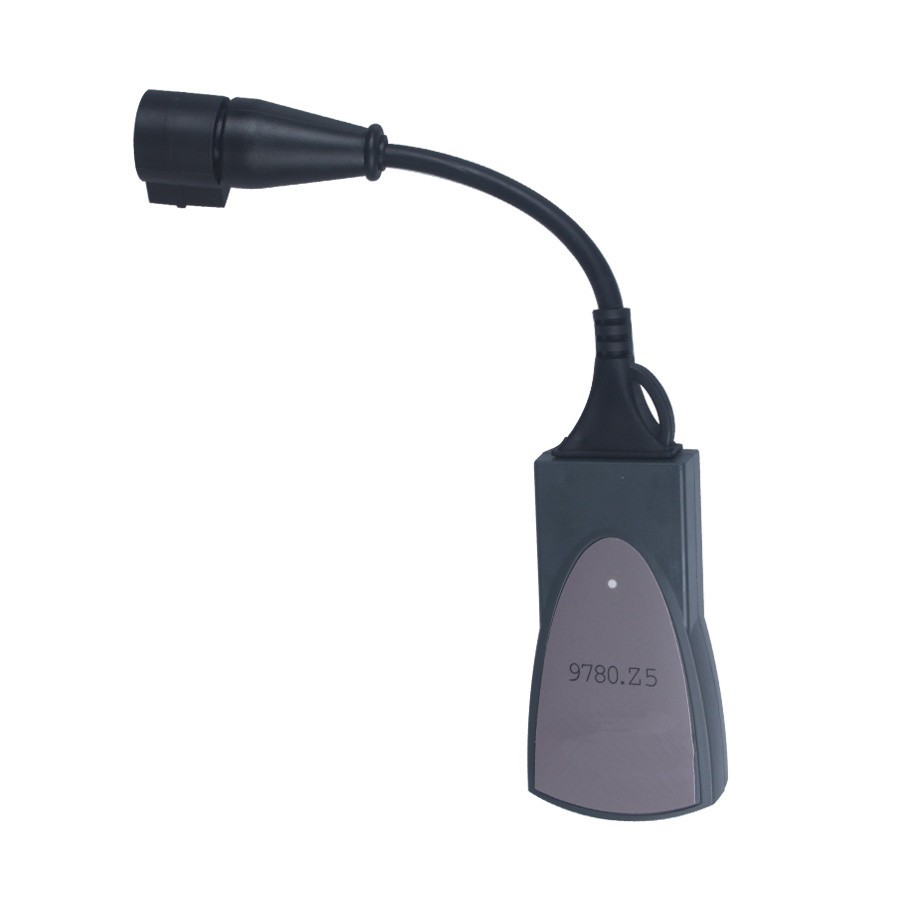
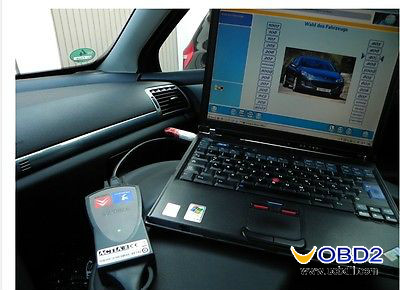
This write-up explains what the difference is among Lexia, Diagbox and Peugeot Planet PP2000, which would be a good idea for a total newbie in car diagnostics software that Lexia 3 cable required.

Both Diagbox and PP2000 are used to connect to the car's ECU and carry out diagnostics and manage settings. Which is a better software, however?


Lexia: Citroen, Planet: Peugeot, Diagbox: Citroen & Peugeot

Lexia3 - hardware

Lexia - Software for Citroen
Planet - Software for Peugeot
Diagbox - Front end which contains variations of both of the above

Diagbox is the only one which is still updated.

The hardware is currently on Revision C.


Diagbox: newer, PP2000: quicker

PP2000 and Diagbox are roughly the same thing , Diagbox being the newer software ,
PP2000 is a quicker software but will become obsolete over the next few years as Peugeot will stop using it this year ,

no point in getting PP2000 then having to change to Diagbox


Peugeot Planet: easier and faster

I have planet and also being a newbie installed planet then diagbox they both worked fine though diagbox was a lot slower (you have to start diagbox then choose planet off the option list) so basically if its just for use on your own car then using planet on its own is easier and faster though if your going to attempt using the interface on other vehicles may as well install diagbox with planet and lexia


Lexia + PP200 = Diagbox

lexia is for citreon
planet pp2000 is for peugeot

put both programmes into one software = diagbox

if your going to buy it you might as swell get diagbox which most new interfaces come with anyway.


Both Lexia & PP2000 available within Diagbox

They are the same.... the discs supplied usually contain PP2000 and Diagbox on one disc (PP2000 is also available within the Diagbox installation), and lexia for Citroens on the other. Lexia is also available within Diagbox.

So if you find an interface with rev C, the software discs will contain everything you need and more.


PP2000 on 32-bit, Diagbox on 64-bit

Planet will only run on 32-bit. Diagbox will run on 64-bit, but when you try to call Planet through Diagbox it will crash because it must have 32-bit.

What I do is install VMWare Player (free). Using that, create a virtual machine XP SP3 32-bit (you will need the disk and key). Then install Planet into that. Works well. Sounds very techy, but it is surprisingly easy, because VMWare is so well documented. When installing Planet, do not plug the Lexia interface in to the PC until prompted.

Planet & Diagbox are software Lexia cable required

The Lexia is the cable required to use the software. Only the cable.

To use the cable you will need software as well, Peugeot Planet and Diagbox are the 2 pieces of software to choose from. 

Diagbox is much newer software that supports even the latest cars. However I prefer the interface of Peugeot Planet, much easier not to get lost in there.

Generally when you buy a Lexia software will be included on a disk. As to whether it is genuine or not, you should check with the seller before purchase. 

Saturday, May 20, 2017

Free download Diagbox V7.82 for Lexia 3 PP2000 Peugeot Citroen scanner

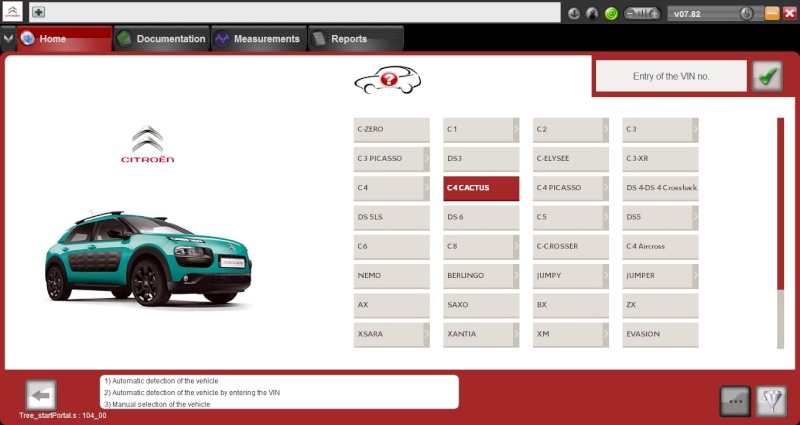
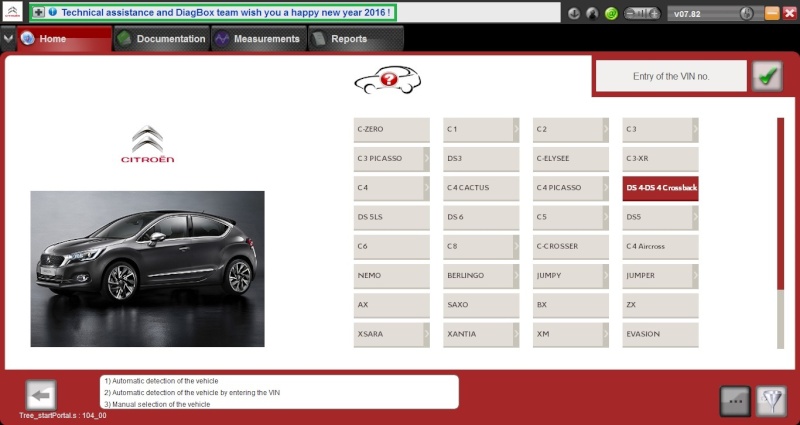
Diagbox V7.82 software can work on Lexia 3 PP2000 Peugeot Citroen scanner. Here are Diagbox V7.82 free download links offered by uobdii.com.
diagbox-v7-82-lexia3-pp2000-2 diagbox-v7-82-lexia3-pp2000-1

Free download Diagbox V7.82 for Lexia 3 PP2000 Peugeot Citroen car diagnostic tool
Link 1:
https://mega.nz/#!h9kFlDrZ!DCpvnmCPB_NDm-wFrea0mGiKDE5giM96-lSXXC1uSIg
Pass: Maitresox01
Or Link 2:
https://drive.google.com/file/d/0BxwoEOC3feWFNl96dTNzVWlqY3M/view?usp=sharing

Install Diagbox V7.82 for Lexia 3 PP2000 on VirtualBox or VMplayer:
  1. a) Ensure that the Hard Disk controller is set to IDE not SCSI.
  2. b) Create a preferably fixed hard drive 20-36GB preferably contiguous, Dynamic also works. (Win XP needs less resource than Win 10)
  3. c) Connect the Windows ISO through the Settings -> Storage menu.
  4. d) Install VirtualBox Guest Additions or VMWare Tools after installing Windows.

Install Diagbox V7.82 for Lexia 3 PP2000 on Windows:
  1. a) Microsoft .NET 3.5 SP1 Framework (needed for Diagbox 7.60+)
  2. b) All necessary drivers (usually covered by the Guest Additions/VMWare Tools)
  3. c) Setup a network adapter (does not need to be connected to network)
  4. d) Mozilla Firefox
  5. e) Winrar
  6. f) Virtual CloneDrive (not needed for Virtual Machines)

Note:
  1. Start only as Administrator and without internet, for those who are running later Windows like 10, XP SP3 compatibility is also required.
  2. Ensure that .NET Framework 3.5 is installed
  3. Systems: Windows (32 bit only) XP, 7, 8, 10

These two forum threads may be helpful:
http://cartechnology.co.uk/showthread.php?tid=11986
http://cartechnology.co.uk/showthread.php?tid=12288

Monday, May 15, 2017

Lexia3 PP2000 Diagbox V8.26 V7.83 V7.76 V7.57 all versions Free download

Lexia3 PP2000 Diagbox V8.26 V7.83 V7.76 V7.57 all previous  versions are available to free download with given password, but please try at your own risk. And hope it is helpful.
Lexia3 PP2000 Diagbox V8.26 V7.83 V7.76 V7.57 all previous  versions are available to free download with given password, but please try at your own risk. And hope it is helpful.  Tips: before downloading, please exit/uninstall firewall or antivirus i.e. Avast, Avira, Bitdefender… and run update on administrator privilege. Lexia3 PP2000 Diagbox V8.26 updated from V8.20: https://mega.nz/#!kkNEmbpR!iTkm4OVDfgTDWRjg3c_-TIWJQnr185jvzN2bML07tlU No password. Works on the interface: Lexia-3 V48 PP2000 V25 with Original 921815C Chip can do Peugeot 307 Lexia DiagBox v7.83 (8.19) updated from v7.82: https://mega.nz/#!IhNFmYrD!GLyERFpKftKAAaHN8mwAzI6p4mqMS9pVSw7EG1gCUM0 Password: Very Simple! DiagBox V7.82 (8.18) updated from V7.76: https://mega.nz/#!h9kFlDrZ!DCpvnmCPB_NDm-wFrea0mGiKDE5giM96-lSXXC1uSIg Password: Maitresox01 DiagBox software V7.74 updated from V7.66:   https://mega.nz/#!A4UgwKwK!hM_J6qXfB8bvq_P4Pa2RF1wxneQJENvkT_jfYyw9ta8 Password: Maitresox pour TLEMCEN TE-100% Lexia3 DiagBox V7.66 updated from V7.62: https://mega.nz/#!15MnEQgR!GZyjMyrkZ1ZmBE_fX4PPM7AVKvSf8IKAbwoJNfkybYU Password: @-Maitresox-MHHAUTO DiagBox V7.62 updated from V7.58:        https://mega.nz/#!gwMyzZxZ!A9XJwl8CgyliFjti6knPhioDzQJPXieUtD1TJRnJG6Y PSA DiagBox V7.58 updated from V7.57: https://mega.nz/#!V8123SrK!w6OE4V15ABi8Ciolou_zfEKbnPhNw4_ylxH3-yr3rmU PSA DiagBox V7.57 updated from V7.01:     https://mega.nz/#!xpdzRATA!uSUYxCEljCMC7z8aDWXb0izjcreCy-MTro80zAMeXxg Do you want a 100% tested OK Diagbox software with tech support? Check this:  Diagbox V7.76: http://www.uobdii.com/wholesale/diagbox-v601-software-for-lexia-3-pp2000.html  System Requirements: Windows XP, 512 MB RAM  Language: Multi-language Bundle sale: Lexia3 V48 PP2000 V25 + Diagbox V7.76 Software only $87  http://www.uobdii.com/wholesale/lexia-3-with-diagbox-v724-software.html
Tips: before downloading, please exit/uninstall firewall or antivirus i.e. Avast, Avira, Bitdefender… and run update on administrator privilege.
Lexia3 PP2000 Diagbox V8.26 updated from V8.20:
https://mega.nz/#!kkNEmbpR!iTkm4OVDfgTDWRjg3c_-TIWJQnr185jvzN2bML07tlU
No password.
Works on the interface: Lexia-3 V48 PP2000 V25 with Original 921815C Chip can do Peugeot 307
Lexia DiagBox v7.83 (8.19) updated from v7.82:
https://mega.nz/#!IhNFmYrD!GLyERFpKftKAAaHN8mwAzI6p4mqMS9pVSw7EG1gCUM0
Password: Very Simple!
DiagBox V7.82 (8.18) updated from V7.76:
https://mega.nz/#!h9kFlDrZ!DCpvnmCPB_NDm-wFrea0mGiKDE5giM96-lSXXC1uSIg
Password: Maitresox01
DiagBox software V7.74 updated from V7.66: 
https://mega.nz/#!A4UgwKwK!hM_J6qXfB8bvq_P4Pa2RF1wxneQJENvkT_jfYyw9ta8
Password: Maitresox pour TLEMCEN TE-100%
Lexia3 DiagBox V7.66 updated from V7.62:
https://mega.nz/#!15MnEQgR!GZyjMyrkZ1ZmBE_fX4PPM7AVKvSf8IKAbwoJNfkybYU
Password: @-Maitresox-MHHAUTO
DiagBox V7.62 updated from V7.58:      
https://mega.nz/#!gwMyzZxZ!A9XJwl8CgyliFjti6knPhioDzQJPXieUtD1TJRnJG6Y
PSA DiagBox V7.58 updated from V7.57:
https://mega.nz/#!V8123SrK!w6OE4V15ABi8Ciolou_zfEKbnPhNw4_ylxH3-yr3rmU
PSA DiagBox V7.57 updated from V7.01:   
https://mega.nz/#!xpdzRATA!uSUYxCEljCMC7z8aDWXb0izjcreCy-MTro80zAMeXxg
Do you want a 100% tested OK Diagbox software with tech support?
Check this:
Diagbox V7.76:
http://www.uobdii.com/wholesale/diagbox-v601-software-for-lexia-3-pp2000.html
System Requirements: Windows XP, 512 MB RAM
Language: Multi-language
Bundle sale: Lexia3 V48 PP2000 V25 + Diagbox V7.76 Software only $87
http://www.uobdii.com/wholesale/lexia-3-with-diagbox-v724-software.html

Tuesday, May 9, 2017

Lexia3 PP2000 Car Diagnostic Tool for Citroen &Peugeot

Are you in a dilemma choosing a fault code scanner for Peugeot 307 Hdi 135 Baujahr 2007? Diagnose for Citroen Saxo Bj 2004? Is it fit for 2006 C5 2.0 HDI? And how to work with XM 3.0 V6 built in 2000? How to diagnose for Peugeot 407 HDi?

These could be difficult problems for an empty-handed person, but it becomes very simple for you just need only Lexia3 PP2000.
It is compatible with Citroen cars including:
C1,C2,C3,C4,C6,C8,C-CROSSER,NEMO,BERLINGO,JUMPY,JUMPER,AX,SAXO,BX and so on

Function of Lexia3/PP2000
Unlike other universal car diagnostic tools which only read fault codes, this software performs nearly ALL the functions like the original dealer diagnostic tool.
lexia3-pp2000-car-diagnostic-tool-1
  1. Read Identification
Displays complete identification of control unit, e.g. part number, software/hardware version, manufacturer, etc…
  1. Read Fault Codes
Displays all stored and pending fault codes with complete description (e.g. “Rail pressure – too low pressure”).Program supports report printing or copy to clipboard.
  1. Clear Fault Codes
This function clears all stored fault codes and other diagnostic information.
  1. Auto-Scan (Complete Car Scan/Test)
Detects all ECUs (electronic control units) installed in car and reads all diagnostic fault codes.
  1. Measured Values
Program displays live Data like Engine Speed, Battery voltage, Oxygen Sensor, Coolant Temperature, etc. Values can be displayed in graph, 9 values at once, or full listing (all measured values). Logging to file is also supported, which allows offline analysis.
  1. Actuator Test
Actuator test activates particular actuator (e.g. turn on fuel pump, lock/unlock wheel, lock/unlock doors, cut off fuel, etc.)
 lexia3-pp2000-car-diagnostic-tool-2

How to test old Citroen and Peugeot
For most cars before 1996, you need old adapter 30 pin-Adapter
For the XM Y4 (1994-2000) you need the 30 pin-Adapter, Lexia-3 30 Pin Cable for Citroen Diagnostic Tool

How to test new Citroen and Peugeot
lexia3-pp2000-car-diagnostic-tool-3
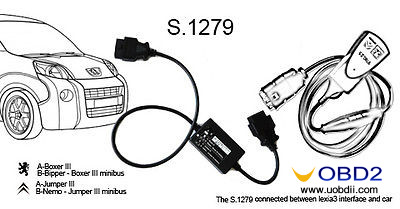
Software Diagbox supports the latest Citroen and Peugeot. But most Lexia3 package has no this interface, you just need S1279, it can connect lexia3 with new cars.
Free download Diagbox V7.82 for Lexia3/PP2000 here:
http://blog.uobdii.com/free-download-diagbox-v7-82-for-lexia-3-pp2000-peugeot-citroen-scanner/

Wednesday, May 3, 2017

(Solved)Lexia-3 PP2000 installation error: not possible to start

Recently received an issue from customer that when install Lexia-3 on windows XP, it appeared an error as follows, here uobdii engineer would give some tips for this problem.
Error message:
AVERTISSMENT
It is not possible to start Peugeot Planet Office for the following reasons:
Peugeot Planet interface is not plugged into the USB port of your PC
Peugeot Planet interface is being utilisation by another application.


Device: Lexia-3 pp2000

Software: Peugeot Planet 2000
Operating system: Windows XP

Possible reasons and solutions:
  1. Host interface of Peugeot Planet can not be connected to the computer’s USB port;
  2. Peugeot Planet 2000 is running on another computer;
  3. After closing the other software, then run Peugeot Planet again.

PP2000 software installation address:
https://mega.nz/#!mRkVXBLa!Fez0E9LU5DJSYFsy6jc_2cydO-69U0VJ7zX3i3T8_vc

Monday, September 19, 2016

Free download Diagbox V7.82 for Lexia 3 PP2000 Peugeot Citroen scanner


Diagbox V7.82 software can work on Lexia 3 PP2000 Peugeot Citroen scanner. Here are Diagbox V7.82 free download links offered by uobdii.com.


Free download Diagbox V7.82 for Lexia 3 PP2000 Peugeot Citroen diagnostic tool

Link 1:

https://mega.nz/#!h9kFlDrZ!DCpvnmCPB_NDm-wFrea0mGiKDE5giM96-lSXXC1uSIg

Pass: Maitresox01

Or Link 2:

https://drive.google.com/file/d/0BxwoEOC3feWFNl96dTNzVWlqY3M/view?usp=sharing


Install Diagbox V7.82 for Lexia 3 PP2000 on VirtualBox or VMplayer:

a) Ensure that the Hard Disk controller is set to IDE not SCSI.

b) Create a preferably fixed hard drive 20-36GB preferably contiguous, Dynamic also works. (Win XP needs less resource than Win 10)

c) Connect the Windows ISO through the Settings -> Storage menu.

d) Install VirtualBox Guest Additions or VMWare Tools after installing Windows.


Install Diagbox V7.82 for Lexia 3 PP2000 on Windows:

a) Microsoft .NET 3.5 SP1 Framework (needed for Diagbox 7.60+)

b) All necessary drivers (usually covered by the Guest Additions/VMWare Tools)

c) Setup a network adapter (does not need to be connected to network)

d) Mozilla Firefox

e) Winrar

f) Virtual CloneDrive (not needed for Virtual Machines)


Note:

1. Start only as Administrator and without internet, for those who are running later Windows like 10, XP SP3 compatibility is also required.

2. Ensure that .NET Framework 3.5 is installed

3. Systems: Windows (32 bit only) XP, 7, 8, 10


These two forum threads may be helpful:

http://cartechnology.co.uk/showthread.php?tid=11986

http://cartechnology.co.uk/showthread.php?tid=12288

Article form OBD2 Blog Site:  http://blog.uobdii.com/free-download-diagbox-v7-82-for-lexia-3-pp2000-peugeot-citroen-scanner/

Saturday, May 14, 2016

DIY Citroen C5 HDI diagnose & tuning

I often find old C5 Phase 1 in degraded engine cool in recent days, but it rolls 70 in the ribs on the motorway, I tighten the buttocks a little!
I love my C5 2.2 hdi exclusive. I bought it used with 125000 km and now total 270,000 km. This is really a great car and I will never give it up.
The easiest thing to get the problem fixed would be go to the local dealer shop and they asked euro 1000, I should leave and try do it myself at half of that price.
I ordered a clone Fgtech Galletto v54 and I bought a Lexia 3 cable with old LEXIA V25, PP2000 and Diagbox soft. I prepare my pipe (for screw FAP), a few tools and here I started.
After receiving my Galetto, I plug my PC 2 (a Win 7 and the other under XP without battery … a bit like the second but stable 220V). First concern, can not find drivers! I contact the dealer, and got the free driver software download link. It worked on another Win XP laptop.
I found that it is safe if follow this way:
– Take a XP laptop rather than Virtuabox, Win 7, Virtual machine etc)
– Turn the laptop screen saver
– Put the computer on AC
– Put the battery charger ‘to avoid the mode “Energy Saving” (I noticed that the transition to Lexia had shot my battery though as new). In this way, galleto will not break my ECU.
Then I turn to my lexia 3 interface.I run software Lexia with good installation tutorial on google but a little time-consuming. I had not seen it in ages (can be on my old cassette TRS80 model). I run some manipulation on the C5 and I found the error codes. LEXIA soft helped erased the fault. It works for everything except for the mini level of fuel additive.
I have to leave for 1500 km with my car in this state. I hope the engine will hold.
Otherwise, on my return, I’ll try the following procedure!
1) Reading ECU Fgtech Galetto v54 master
2) Modify it with ECUSAFE (I think my model is the basis of the version 2.0.0)
3) Upload the modified carto
4) Diagnose with the LEXIA (this is where I need to find the right path in the soft menus) to transfer the additive Calculos the computer (BSI)
5) Physical Défapage
6) still on this way…..i am lost
So I have to turn to forum to help. The moderator suggested getting MPPS V16 (clone) instead of galletto. He said the mpps is much safer and provides a generic mode.
Anyway I went ahead with MPPS and ECUsafe:
–extraction of mapping with MPPS: OK
–Change with ECUSAFE: OK
–writing with MPPS : as a bit of a fever at that time (this is my first time …) and OK
I’ve done this before yesterday and I drove with the car to see if everything was ok. So:
1) more anomaly “minimum additive diesel”
2) at a steady speed, the problem “ESP / ASR deactivated”, “Pollution Problem” returned That leaves me a LEXIA phase pass that I do not control the all. So if you can help me find the right manipulation to achieve on LEXIA, I could then move on to the mechanics DEFFAPAGE phase.
Okay so I went in the LEXIA and selected the vehicle after I entered in diagnosis menu, tested by functions and power train. Then I remember I was able to enter the bsi then in telescoping presents options either GO additive (our friend the Ceria or Eolys) I could set off  then engine with FAP also encoded missing so I retest all this tomorrow by making a small twenty km.
FAP and some other parameter recorded on my lexia software. I have made ​​the global test, I entered all functions with default, read all the faults and deleted all faults. Restarted with a global test and still have a defect on the injection: a circuit pre-post heating relay (P0380 code). Could this be the cause of pb “anomaly anti pollution”?


Updated:
Next day, I drove a little and tried to start the engine degraded to see new defects. Because that FAP, I’d kick him out! And next week, I have 800 km to go! (2 * 400) and it’s really scary driving on Highway with the mill in degraded mode (especially with those who ride to 130 speed control see on the left …)


Another day, I have the C5 diagnosed and recorded the parameter again.


This time I found the pre-post heating problem and all problems additive level and that’s it! for now … for abs, I admit to not having looked and my computer does not have a battery so I’m forced to take an extension cord and go in the street … not really practical at night!
I confirm I have already read information lexia reported! But I thought this was mostly due to the effect of “chimney” vacuum FAP (more exhaust resistance)
Well, I have to make a 20 km to find a defect and move to LEXIA!

Tuesday, May 10, 2016

Is Chinese Lexia PP2000 a full Chips interface?

Many users ask a same question: is Lexia 3 PP2000 a full Chips interface?
Many users have proved that, Lexia 3 (SP08-C) is a full Chips interface, NO. SP08 and SP08-B is not a full chips interface.

Suggest you go on reading this post to know Lexia3 (SP08-C) newest highlights, and other Lexia 3 users feedback.

Lexia3 (SP08-C) newest highlights-released at 10-15-2014:
  1. Lexia-3 PCB edge is golden with original full chips.Double PCB has 7pcs optocouplers, which are 100% original and new.
  2. lexia-3 relays are 12pcs, which are 4.5V, it is more stable.
  3. PP2000 has 2pcs Optocouplers.

Lexia-3 user feedback as following parts list.
Quickly shipment
I have received my order
Very quickly
Very good material
I am very satisfied

Works perfectly, Recommend 
Works perfectly.
PP2000 Lexia and stable.
diagbox v6.01 also works very well but very heavy to operate which causes some delays malgrés correct config for the diag (T400 under XP with 4GB of RAM).
Tool very efficient!
Recommend!


Difference among the model SP08-SP08-D and C (compatible 307)
They are almost same tool, share same function and features, the difference is that Lexia 3 (SP08-C) is the most stable to diagnose 307.

Why Lexia 3 (SP08-C) is best-selling
  • Lexia 3 (SP08-C) is a full Chips interface
  • Best model to diagnose Peugeot

Lexia3 can’t do:
  • Lexia 3 is no good after 2004 C5
  • Lexia 3 does not work on windows 7, windows xp only

What’s your feedback?

Sunday, March 20, 2016

(Tested) Lexi3 PP2000 Diagbox for Peugeot and Citroen vehicle model coverage

Having been playing around lexia 3 diagnostic tool for PSA groups, I have tested successfully on lots of Citroens and Peugeots. Since there is no detail function and vehicle list on the webpage (as list where mine from), I should be first one.


My Lexia 3 PP2000 OBDⅡtool: $79 from UOBD2


Package includes:

Lexia 3 (full adaptors) and 30 PIN connector


PSA: Lexia -3 protocol K+CAN, Citroen, Peugeot 1995-2010

PSA: Lexia -3 30 PIN connector before 1996


Software version:

Lexia 3 V45

PP2000 V25

Diagbox V5.75


Lexia 3 diagnostic tool function achieves:


1. Read/ Erase trouble codes

Display all stored and pending faults codes with full description, e.g “Rail pressure-too low pressure”

Program support report or copy to clipboard


2. Read identification

Displays full identification if ECU control units, e.g part number, software/hardware version


3. Auto scan

Detect all ECU control units in the car and read diagnostic faults codes


4. Actuator test / customize settings

Activates particular actuators, like lock/unlock wheel, lock/unlock door, enable fuel pump etc


5. Programming functions

Lexia 3 is able to access multi-system, like engine, transmission, brake, airbag, immobilizer, body to proceed configuration programming


6. Measured values


Display live data, like engine speed, battery voltage, oxygen sensor, coolant temper,


7. Customize settings

Activate cruise control, disable DRL (daytime running lights), disable TPMS lights etc.


Tested vehicle models with Lexia 3 PP2000 diagbox


Citroen:

1995 Citroen XM 2.5 TD Norway

1998 Citroen XantiaⅡ2.0 16V Russia

1998 Citroen XM 2.0 TurboCT Portugal

2001 Citroen C5 HDi Portugal

2001 Citroen C5 2.0 HPi V16 Netherland

2001 Citroen Saxo 1.1 Finland

2001 Citroen 2.0 HDi 90hp Belarus

2001 Citroen 2.2 HDi Poland

2002 Citroen Evasion 2.0HDi RHW Belarus

2003 Citroen C3 1.4 Auto UK

2003 Citroen Xsara Picasso 1.8 16V Netherland

2003 Citroen Xsara Picasso 1.8 16V SX Finland

2004 Citroen Xsara 1.6 V16 110hp Belarus

2007 Citroen C5 2.0 HDi Hungary

2008 Citroen C3 1.4 Finland

2009 Citroen C4 1.6 THP Greece

2010 Citroen C4 HDi Argentina


Peugeot Planet 2000 for Peugeot:


1997 Peugeot 406 1.8i XU7JP4 Belarus

1998 Peugeot 106 Electric Norway

1999 Peugeot 406 2.0 HDi 90hp Belarus

2001 Peugeot 206 XR 1.6 V8 Argentina

2001 Peugeot 406 2.0 HDi 110hp Belarus

2001 Peugeot 406 2.2 HDi Finland

2001 Peugeot 607 2.2 HDi Diesel Ireland

2002 Peugeot 206 Petrol Russia

2002 Peugeot 307 2.0HDi Finland

2002 Peugeot 406 1.8i EW7J4 Belarus

2003 Peugeot 406 2.0 HDi 110hp Belarus

2003 Peugeot 307 1.6 XS Petrol Malaysia

2004 Peugeot 307 1.6 HDi SXI 56 UK

2005 Peugeot 307 2.0 HDi SW 100Kw V16 Austria

2006 Peugeot 407 2.0 HDi UK

2007 Peugeot 207 1.6 V16 Argentina

2007 Peugeot 307 1.6 Hdi Finland

2010 Peugeot 307 1.6 V16 Argentina


ALL the test results are based on Lexia 3 V45, the latest V48 adds more model possibility, especially Peugeot 307. Because V45 works week on Pug 307 module.