Showing posts with label lexia citroen. Show all posts

Sunday, March 20, 2016

(Tested) Lexi3 PP2000 Diagbox for Peugeot and Citroen vehicle model coverage

Having been playing around lexia 3 diagnostic tool for PSA groups, I have tested successfully on lots of Citroens and Peugeots. Since there is no detail function and vehicle list on the webpage (as list where mine from), I should be first one.


My Lexia 3 PP2000 OBDⅡtool: $79 from UOBD2


Package includes:

Lexia 3 (full adaptors) and 30 PIN connector


PSA: Lexia -3 protocol K+CAN, Citroen, Peugeot 1995-2010

PSA: Lexia -3 30 PIN connector before 1996


Software version:

Lexia 3 V45

PP2000 V25

Diagbox V5.75


Lexia 3 diagnostic tool function achieves:


1. Read/ Erase trouble codes

Display all stored and pending faults codes with full description, e.g “Rail pressure-too low pressure”

Program support report or copy to clipboard


2. Read identification

Displays full identification if ECU control units, e.g part number, software/hardware version


3. Auto scan

Detect all ECU control units in the car and read diagnostic faults codes


4. Actuator test / customize settings

Activates particular actuators, like lock/unlock wheel, lock/unlock door, enable fuel pump etc


5. Programming functions

Lexia 3 is able to access multi-system, like engine, transmission, brake, airbag, immobilizer, body to proceed configuration programming


6. Measured values


Display live data, like engine speed, battery voltage, oxygen sensor, coolant temper,


7. Customize settings

Activate cruise control, disable DRL (daytime running lights), disable TPMS lights etc.


Tested vehicle models with Lexia 3 PP2000 diagbox


Citroen:

1995 Citroen XM 2.5 TD Norway

1998 Citroen XantiaⅡ2.0 16V Russia

1998 Citroen XM 2.0 TurboCT Portugal

2001 Citroen C5 HDi Portugal

2001 Citroen C5 2.0 HPi V16 Netherland

2001 Citroen Saxo 1.1 Finland

2001 Citroen 2.0 HDi 90hp Belarus

2001 Citroen 2.2 HDi Poland

2002 Citroen Evasion 2.0HDi RHW Belarus

2003 Citroen C3 1.4 Auto UK

2003 Citroen Xsara Picasso 1.8 16V Netherland

2003 Citroen Xsara Picasso 1.8 16V SX Finland

2004 Citroen Xsara 1.6 V16 110hp Belarus

2007 Citroen C5 2.0 HDi Hungary

2008 Citroen C3 1.4 Finland

2009 Citroen C4 1.6 THP Greece

2010 Citroen C4 HDi Argentina


Peugeot Planet 2000 for Peugeot:


1997 Peugeot 406 1.8i XU7JP4 Belarus

1998 Peugeot 106 Electric Norway

1999 Peugeot 406 2.0 HDi 90hp Belarus

2001 Peugeot 206 XR 1.6 V8 Argentina

2001 Peugeot 406 2.0 HDi 110hp Belarus

2001 Peugeot 406 2.2 HDi Finland

2001 Peugeot 607 2.2 HDi Diesel Ireland

2002 Peugeot 206 Petrol Russia

2002 Peugeot 307 2.0HDi Finland

2002 Peugeot 406 1.8i EW7J4 Belarus

2003 Peugeot 406 2.0 HDi 110hp Belarus

2003 Peugeot 307 1.6 XS Petrol Malaysia

2004 Peugeot 307 1.6 HDi SXI 56 UK

2005 Peugeot 307 2.0 HDi SW 100Kw V16 Austria

2006 Peugeot 407 2.0 HDi UK

2007 Peugeot 207 1.6 V16 Argentina

2007 Peugeot 307 1.6 Hdi Finland

2010 Peugeot 307 1.6 V16 Argentina


ALL the test results are based on Lexia 3 V45, the latest V48 adds more model possibility, especially Peugeot 307. Because V45 works week on Pug 307 module.

How to solve Citroen and Peugeot Lexia 3 PP2000 central locking problem

Vehicle example:
Peugeot 307 2.0 HDi 2005

Diagnostic equipment:
Lexia 3 Peugeot Planet PP2000 for Citroen and Peugeot OBDⅡdiagnostic interface

Problem:
New Pug 307 comes with one original key, so I have to make a new backup key. Got a blank key and got the key cut and programmed with lexia 3 PP2000 diagnostic software. Then I have two new keys that can start the car.

The problem is I can't get the central locking bit to sync (key fob stopped working). At first I doubted the IGN+ position (with engine ON or OFF at the same time). Soon I figured out that I should leave the ignition switch ON without starting the engine.

I got a good key programming document with PP2000 and followed it step by step:
How to program Peugeot new key with Lexia3 PP2000 diagnostic tool

I was stopped at the learning transponder key procedure. I search around Pug forums and finally got the answer.


Solution:
The problem lies on the lexia 3 PCB.

There are different types of PCB on the aftermarket:
1. Original keys which works fine
2. Copy keys sometimes PCB sometimes does not work
3. Second hand keys PCB can not be programmed again

Make sure you get the correct PCB, take this one on uobdii.com
1. Lexia-3 PCB edge is golden with original full chips. Double PCB has 7pcs optocouplers, which are 100% original and new.
2. lexia-3 relays are 12pcs, which are 4.5V, it is more stable.
3. PP2000 has 2pcs Optocouplers.

Saturday, March 19, 2016

How to activate Citroen Cruise Control with Lexia 3 Diagbox diagnostic too

Equipment:
Lexia 3 V48 PP2000V25 Diagbox V7.36 (the latest is V7.57) for Peugeot and Citroen diagnosis

Vehicle model Example
Citroen Berlingo

Activating Berlingo Cruise control instruction:

1)Install and activate Lexia 3 Diagbox software. Free download related user manual on uobdii.com webpage. 
2)Come to the main menu, select vehicle brand as Citroen


3)Select vehicle model Berlingo-> Berlingo (B9)


4)Confirm the VIN read information and then click green tick icon to continue


5) Select DELIVERY OF VEHICLE TO CUSTOMER


6)Go down the next program and select ACCESSORY


7) Turn the ignition ON with engine off


8) Manually enter the vehicle’s RPO/DAM number


9)  The DAM number is available on a sticker attached to the driver side front/rear door pillar which also includes tire pressures etc.  Here the DAM number is 5-digit number marked red in picture below.

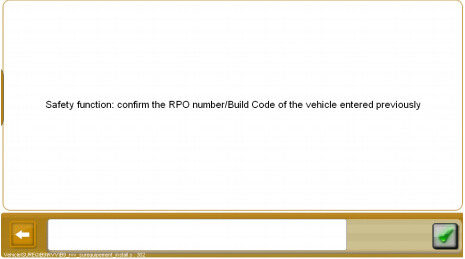
10) Confirm the PRO number or Build code of the vehicle entered previously and tick green icon.


11) Re-enter the vehicle’s RPO/DAM number


12) Switch off the ignition for 30 s and validate to continue.


13) The time is count down to 0.


14) Switch on the ignition switch after 30 s.


15) Switch off the ignition and wait for 15 s. Switch the ignition on again.


16) Cruise control for Citroen is complete


17) Hit Back icon to back to the main function menu and select other diagnostic functions.


18) Exit the Lexia 3 Diagbox diagnostic software program.

Friday, March 18, 2016

How to load Lexia 3 Peugeot Planet PP2000 diagnostic software to car ECU

Diagnostic tool needs:
Lexia 3 lexia-3 V48 diagnostic interface with Peugeot Planet PP2000 V25 diagnostic software

1.After well install and activate lexia 3 software, open and run Peugeot Planet Office on the desktop

2.Click F1 to key to cancel when the system pops out update warning message
3.Select vehicle model, here takes an example of 306R

4. Select application as Peugeot Planet 2000


5. Enter 4-digit Build code in Entering the vehicle information interface

NOTE:
Build Cod, also called RP or ORGA number for Citroens, is built in PSA Group factories. This can be used to determine the exact age of the vehicle (as opposed to date from registration info, which is all that RAC vehicle info etc. have to go on), as well as parts suitability - for instance where there was a changeover or variation during production you may see references such as “From O 8161” in the parts system. This is normally a 4 digit long number and identifies where the vehicle came in the production run.

To find the Build Code of vehicle, you need to look under the bonnet:

1) Earlier cars, the Build Code is painted (probably in green) onto the driver's side suspension turret. It is a 6 digit number, the first 4 digits of which are your Build Code.

2) In later cars the Build Code can be found on a small white sticker on the passenger side bulkhead.

If the build code is 09704 88 1 0759, then you put the number in Planet is 0970.

6. Then select ECU configuration and services


7. Select Global test


8. Switch on the ignition.
Connect the adaptor part number AC911684 ro the USB communication card (Peugeot Plant Interface)
Connect the portable to the test connector C001


9. Peugeot Planet PP2000 is successfully loaded to car ECU.

Thursday, March 17, 2016

How to program Peugeot new key with Lexia3 PP2000 diagnostic tool

Equipment:
Lexia3 V48 PP2000 V25 diagnostic interface

NOTE:
PIN Code is required during key programming procedure. Record your vehicle PIN code first.

V156 Renault CAN Clip torrent Free Download:
http://blog.uobdii.com/v156-renault-can-clip-torrent-free-download/

Instruction:

1.Install and activate Lexia 3 PP2000 V25 diagnostic software
2.Select vehicle model 307 and wait until the well communication built
3.Check the entering vehicle information


4.Select the application as Peugeot Plant 2000 and confirm it


5.Select test by ECU
6.Select Built-in systems interface


7.The system is reading the ECU in progress, follow and accept the windows prompts.
8.Select Learning option under Carry out the tests menu display


9. Select Programming of keys


10. The system will display key programming procedure when activation process is complete. Confirm to continue. 
11. Confirm Unlocking the E.C.U program
12. Manually enter the Confidential code (PIN Code)


13. The system is verifying the PIN code. If the code is correct, the built-in systems interface is ready for programming of keys. 
14. Enter the key number to be learnt. The number of keys to be programmed cannot exceed 5.


15. Follow the screen prompt to switch off the ignition
16. Then switch ignition to ON within 15 s.


17. Key programmed, switch off the ignition and take out the key


18. Switch ignition ON again and insert the next key in the ignition. Repeat the key programming procedure to program another key. When complete programming, the system will display keys that are programmed.


19. Follow the screen instructions. Check the handbrake is on. For an automatic gearbox, check the gear level is in position “P”. For a manual gearbox, check that the gear level is in neutral
20. Follow the re-synchronies the HF remote controls procedure to operate until the “End of key programming procedure” notice displays. Exit the program.