Showing posts with label lexia3 peugeot. Show all posts

Friday, September 23, 2016

Lexia3 PP2000 Car Diagnostic Tool for Citroen &Peugeot

Are you in a dilemma choosing a fault code scanner for Peugeot 307 Hdi 135 Baujahr 2007? Diagnose for Citroen Saxo Bj 2004? Is it fit for 2006 C5 2.0 HDI? And how to work with XM 3.0 V6 built in 2000? How to diagnose for Peugeot 407 HDi?

These could be difficult problems for an empty-handed person, but it becomes very simple for you just need only Lexia3 PP2000.
It is compatible with Citroen cars including:
C1,C2,C3,C4,C6,C8,C-CROSSER,NEMO,BERLINGO,JUMPY,JUMPER,AX,SAXO,BX and so on

Function of Lexia3/PP2000
Unlike other universal car diagnostic tools which only read fault codes, this software performs nearly ALL the functions like the original dealer diagnostic tool.
lexia3-pp2000-car-diagnostic-tool-1
  1. Read Identification
Displays complete identification of control unit, e.g. part number, software/hardware version, manufacturer, etc...
  1. Read Fault Codes
Displays all stored and pending fault codes with complete description (e.g. "Rail pressure - too low pressure").Program supports report printing or copy to clipboard.
  1. Clear Fault Codes
This function clears all stored fault codes and other diagnostic information.
  1. Auto-Scan (Complete Car Scan/Test)
Detects all ECUs (electronic control units) installed in car and reads all diagnostic fault codes.
  1. Measured Values
Program displays live Data like Engine Speed, Battery voltage, Oxygen Sensor, Coolant Temperature, etc. Values can be displayed in graph, 9 values at once, or full listing (all measured values). Logging to file is also supported, which allows offline analysis.
  1. Actuator Test
Actuator test activates particular actuator (e.g. turn on fuel pump, lock/unlock wheel, lock/unlock doors, cut off fuel, etc.)
 lexia3-pp2000-car-diagnostic-tool-2

How to test old Citroen and Peugeot
For most cars before 1996, you need old adapter 30 pin-Adapter
For the XM Y4 (1994-2000) you need the 30 pin-Adapter, Lexia-3 30 Pin Cable for Citroen Diagnostic Tool

How to test new Citroen and Peugeot
lexia3-pp2000-car-diagnostic-tool-3
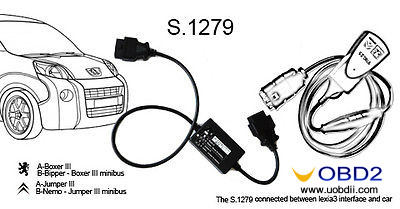
Software Diagbox supports the latest Citroen and Peugeot. But most Lexia3 package has no this interface, you just need S1279, it can connect lexia3 with new cars.
Free download Diagbox V7.82 for Lexia3/PP2000 here:
http://blog.uobdii.com/free-download-diagbox-v7-82-for-lexia-3-pp2000-peugeot-citroen-scanner/

Sunday, March 20, 2016

(Tested) Lexi3 PP2000 Diagbox for Peugeot and Citroen vehicle model coverage

Having been playing around lexia 3 diagnostic tool for PSA groups, I have tested successfully on lots of Citroens and Peugeots. Since there is no detail function and vehicle list on the webpage (as list where mine from), I should be first one.


My Lexia 3 PP2000 OBDⅡtool: $79 from UOBD2


Package includes:

Lexia 3 (full adaptors) and 30 PIN connector


PSA: Lexia -3 protocol K+CAN, Citroen, Peugeot 1995-2010

PSA: Lexia -3 30 PIN connector before 1996


Software version:

Lexia 3 V45

PP2000 V25

Diagbox V5.75


Lexia 3 diagnostic tool function achieves:


1. Read/ Erase trouble codes

Display all stored and pending faults codes with full description, e.g “Rail pressure-too low pressure”

Program support report or copy to clipboard


2. Read identification

Displays full identification if ECU control units, e.g part number, software/hardware version


3. Auto scan

Detect all ECU control units in the car and read diagnostic faults codes


4. Actuator test / customize settings

Activates particular actuators, like lock/unlock wheel, lock/unlock door, enable fuel pump etc


5. Programming functions

Lexia 3 is able to access multi-system, like engine, transmission, brake, airbag, immobilizer, body to proceed configuration programming


6. Measured values


Display live data, like engine speed, battery voltage, oxygen sensor, coolant temper,


7. Customize settings

Activate cruise control, disable DRL (daytime running lights), disable TPMS lights etc.


Tested vehicle models with Lexia 3 PP2000 diagbox


Citroen:

1995 Citroen XM 2.5 TD Norway

1998 Citroen XantiaⅡ2.0 16V Russia

1998 Citroen XM 2.0 TurboCT Portugal

2001 Citroen C5 HDi Portugal

2001 Citroen C5 2.0 HPi V16 Netherland

2001 Citroen Saxo 1.1 Finland

2001 Citroen 2.0 HDi 90hp Belarus

2001 Citroen 2.2 HDi Poland

2002 Citroen Evasion 2.0HDi RHW Belarus

2003 Citroen C3 1.4 Auto UK

2003 Citroen Xsara Picasso 1.8 16V Netherland

2003 Citroen Xsara Picasso 1.8 16V SX Finland

2004 Citroen Xsara 1.6 V16 110hp Belarus

2007 Citroen C5 2.0 HDi Hungary

2008 Citroen C3 1.4 Finland

2009 Citroen C4 1.6 THP Greece

2010 Citroen C4 HDi Argentina


Peugeot Planet 2000 for Peugeot:


1997 Peugeot 406 1.8i XU7JP4 Belarus

1998 Peugeot 106 Electric Norway

1999 Peugeot 406 2.0 HDi 90hp Belarus

2001 Peugeot 206 XR 1.6 V8 Argentina

2001 Peugeot 406 2.0 HDi 110hp Belarus

2001 Peugeot 406 2.2 HDi Finland

2001 Peugeot 607 2.2 HDi Diesel Ireland

2002 Peugeot 206 Petrol Russia

2002 Peugeot 307 2.0HDi Finland

2002 Peugeot 406 1.8i EW7J4 Belarus

2003 Peugeot 406 2.0 HDi 110hp Belarus

2003 Peugeot 307 1.6 XS Petrol Malaysia

2004 Peugeot 307 1.6 HDi SXI 56 UK

2005 Peugeot 307 2.0 HDi SW 100Kw V16 Austria

2006 Peugeot 407 2.0 HDi UK

2007 Peugeot 207 1.6 V16 Argentina

2007 Peugeot 307 1.6 Hdi Finland

2010 Peugeot 307 1.6 V16 Argentina


ALL the test results are based on Lexia 3 V45, the latest V48 adds more model possibility, especially Peugeot 307. Because V45 works week on Pug 307 module.
How to solve Citroen and Peugeot Lexia 3 PP2000 central locking problem

Vehicle example:
Peugeot 307 2.0 HDi 2005

Diagnostic equipment:
Lexia 3 Peugeot Planet PP2000 for Citroen and Peugeot OBDⅡdiagnostic interface

Problem:
New Pug 307 comes with one original key, so I have to make a new backup key. Got a blank key and got the key cut and programmed with lexia 3 PP2000 diagnostic software. Then I have two new keys that can start the car.

The problem is I can't get the central locking bit to sync (key fob stopped working). At first I doubted the IGN+ position (with engine ON or OFF at the same time). Soon I figured out that I should leave the ignition switch ON without starting the engine.

I got a good key programming document with PP2000 and followed it step by step:
How to program Peugeot new key with Lexia3 PP2000 diagnostic tool

I was stopped at the learning transponder key procedure. I search around Pug forums and finally got the answer.


Solution:
The problem lies on the lexia 3 PCB.

There are different types of PCB on the aftermarket:
1. Original keys which works fine
2. Copy keys sometimes PCB sometimes does not work
3. Second hand keys PCB can not be programmed again

Make sure you get the correct PCB, take this one on uobdii.com
1. Lexia-3 PCB edge is golden with original full chips. Double PCB has 7pcs optocouplers, which are 100% original and new.
2. lexia-3 relays are 12pcs, which are 4.5V, it is more stable.
3. PP2000 has 2pcs Optocouplers.

Saturday, March 19, 2016

How to disable Citroen DS3 DRLs with Lexia 3 Diagbox diagnostic tool


Lexia3 Diagbox is possible to erform various customize settings, disable day time running lights (DRLs) included. Latest Lexia3 V48 Diagbox V5.75 is available in eobd2.fr at a perfect price €65. 

Here is the step-by-step guide of turning off DRLs with lexia 3 Diagbox diagnostic interface:

1. Install Lexia 3 Diagbox software 
How to install Diagbox V7.57 for Lexia-3 PP2000 Citroen and Peugeot

2. Plug the lexia 3 diagnostic interface into the OBD socket 

3. Select Citroen in Brand selection menu 

4. Select vehicle model: DS3

Validate VIN (Check mark)
5. Select Diagbox application 

6. Select Global Test 

7. Select Diagnosis 

8. Select Built-in System interface (BSI)

9. Scroll down to Vehicle Configuration, click OK


10. You will be able to view lists of customize settings, like hazard warning lamps, fog lamps day time running lamps etc. 

Click Simultaneous illuminations of the day running lights and sides lights, change the status yes to NO

Daytime running lights are successfully disabled. 


Lexia3 Diagbox is possible to erform various customize settings, disable day time running lights (DRLs) included. Latest Lexia3 V48 Diagbox V5.75 is available in eobd2.fr at a perfect price €65. 

Here is the step-by-step guide of turning off DRLs with lexia 3 Diagbox diagnostic interface:

1. Install Lexia 3 Diagbox software 
How to install Diagbox V7.57 for Lexia-3 PP2000 Citroen and Peugeot

2. Plug the lexia 3 diagnostic interface into the OBD socket 

3. Select Citroen in Brand selection menu 

4. Select vehicle model: DS3

Validate VIN (Check mark)
5. Select Diagbox application 

6. Select Global Test 

7. Select Diagnosis 

8. Select Built-in System interface (BSI)

9. Scroll down to Vehicle Configuration, click OK


10. You will be able to view lists of customize settings, like hazard warning lamps, fog lamps day time running lamps etc. 

Click Simultaneous illuminations of the day running lights and sides lights, change the status yes to NO

Daytime running lights are successfully disabled. 

Friday, March 18, 2016

How to bleed brake for Citroen C5 with Lexia 3 Diagbox diagnostic tool

Equipment:
Lexia 3 V48 Diagbox V7.57 diagnostic interface

Install Lexia Diagbox software
Select Citroen in Brand selection menu
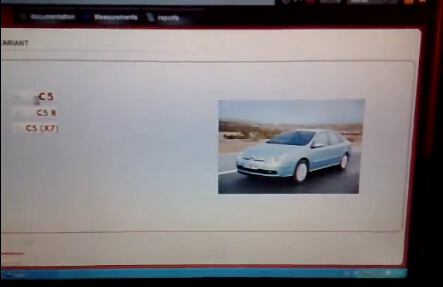
Select vehicle model: C5->C5


Click Tick mark to confirm ACTIVATION notice
Select application as LEXIA
Enter Activation code to activate

Back to APPLICATION menu and select second option
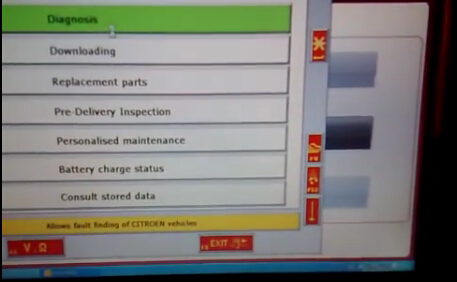
Select Diagnosis


Select Test by function


Switch off the ignition and switch it on again
Select driving aids (4th option)


Pull down the list and select road holding (ABS…)


The system is searching for the vehicle configuration

There are four options under road holding menu:
BSI
Instrument panel
Injection
Anti-lock brake system


Change Instrument panel, Injection and Anti-lock brake system to YES by click corresponding icons


Build communication with ECU
Accept Ecu ESP-MK60 Validate to continue
Accept the system pop-up message
Select “Bleeding” in next interface


Accept windows notice and follow the screen instructions
Bleeding Citroen C5 brake system procedure is complete