Sunday, March 20, 2016

How to solve Citroen and Peugeot Lexia 3 PP2000 central locking problem

Vehicle example:
Peugeot 307 2.0 HDi 2005

Diagnostic equipment:
Lexia 3 Peugeot Planet PP2000 for Citroen and Peugeot OBDⅡdiagnostic interface

Problem:
New Pug 307 comes with one original key, so I have to make a new backup key. Got a blank key and got the key cut and programmed with lexia 3 PP2000 diagnostic software. Then I have two new keys that can start the car.

The problem is I can't get the central locking bit to sync (key fob stopped working). At first I doubted the IGN+ position (with engine ON or OFF at the same time). Soon I figured out that I should leave the ignition switch ON without starting the engine.

I got a good key programming document with PP2000 and followed it step by step:
How to program Peugeot new key with Lexia3 PP2000 diagnostic tool

I was stopped at the learning transponder key procedure. I search around Pug forums and finally got the answer.


Solution:
The problem lies on the lexia 3 PCB.

There are different types of PCB on the aftermarket:
1. Original keys which works fine
2. Copy keys sometimes PCB sometimes does not work
3. Second hand keys PCB can not be programmed again

Make sure you get the correct PCB, take this one on uobdii.com
1. Lexia-3 PCB edge is golden with original full chips. Double PCB has 7pcs optocouplers, which are 100% original and new.
2. lexia-3 relays are 12pcs, which are 4.5V, it is more stable.
3. PP2000 has 2pcs Optocouplers.

Saturday, March 19, 2016

How to activate Citroen Cruise Control with Lexia 3 Diagbox diagnostic too

Equipment:
Lexia 3 V48 PP2000V25 Diagbox V7.36 (the latest is V7.57) for Peugeot and Citroen diagnosis

Vehicle model Example
Citroen Berlingo

Activating Berlingo Cruise control instruction:

1)Install and activate Lexia 3 Diagbox software. Free download related user manual on uobdii.com webpage. 
2)Come to the main menu, select vehicle brand as Citroen


3)Select vehicle model Berlingo-> Berlingo (B9)


4)Confirm the VIN read information and then click green tick icon to continue


5) Select DELIVERY OF VEHICLE TO CUSTOMER


6)Go down the next program and select ACCESSORY


7) Turn the ignition ON with engine off


8) Manually enter the vehicle’s RPO/DAM number


9)  The DAM number is available on a sticker attached to the driver side front/rear door pillar which also includes tire pressures etc.  Here the DAM number is 5-digit number marked red in picture below.

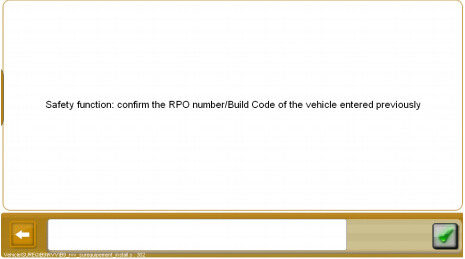
10) Confirm the PRO number or Build code of the vehicle entered previously and tick green icon.


11) Re-enter the vehicle’s RPO/DAM number


12) Switch off the ignition for 30 s and validate to continue.


13) The time is count down to 0.


14) Switch on the ignition switch after 30 s.


15) Switch off the ignition and wait for 15 s. Switch the ignition on again.


16) Cruise control for Citroen is complete


17) Hit Back icon to back to the main function menu and select other diagnostic functions.


18) Exit the Lexia 3 Diagbox diagnostic software program.

How to disable Citroen DS3 DRLs with Lexia 3 Diagbox diagnostic tool


Lexia3 Diagbox is possible to erform various customize settings, disable day time running lights (DRLs) included. Latest Lexia3 V48 Diagbox V5.75 is available in eobd2.fr at a perfect price €65. 

Here is the step-by-step guide of turning off DRLs with lexia 3 Diagbox diagnostic interface:

1. Install Lexia 3 Diagbox software 
How to install Diagbox V7.57 for Lexia-3 PP2000 Citroen and Peugeot

2. Plug the lexia 3 diagnostic interface into the OBD socket 

3. Select Citroen in Brand selection menu 

4. Select vehicle model: DS3

Validate VIN (Check mark)
5. Select Diagbox application 

6. Select Global Test 

7. Select Diagnosis 

8. Select Built-in System interface (BSI)

9. Scroll down to Vehicle Configuration, click OK


10. You will be able to view lists of customize settings, like hazard warning lamps, fog lamps day time running lamps etc. 

Click Simultaneous illuminations of the day running lights and sides lights, change the status “yes” to “NO”

Daytime running lights are successfully disabled. 


Lexia3 Diagbox is possible to erform various customize settings, disable day time running lights (DRLs) included. Latest Lexia3 V48 Diagbox V5.75 is available in eobd2.fr at a perfect price €65. 

Here is the step-by-step guide of turning off DRLs with lexia 3 Diagbox diagnostic interface:

1. Install Lexia 3 Diagbox software 
How to install Diagbox V7.57 for Lexia-3 PP2000 Citroen and Peugeot

2. Plug the lexia 3 diagnostic interface into the OBD socket 

3. Select Citroen in Brand selection menu 

4. Select vehicle model: DS3

Validate VIN (Check mark)
5. Select Diagbox application 

6. Select Global Test 

7. Select Diagnosis 

8. Select Built-in System interface (BSI)

9. Scroll down to Vehicle Configuration, click OK


10. You will be able to view lists of customize settings, like hazard warning lamps, fog lamps day time running lamps etc. 

Click Simultaneous illuminations of the day running lights and sides lights, change the status “yes” to “NO”

Daytime running lights are successfully disabled. 

Friday, March 18, 2016

How to bleed brake for Citroen C5 with Lexia 3 Diagbox diagnostic tool

Equipment:
Lexia 3 V48 Diagbox V7.57 diagnostic interface

Install Lexia Diagbox software
Select Citroen in Brand selection menu
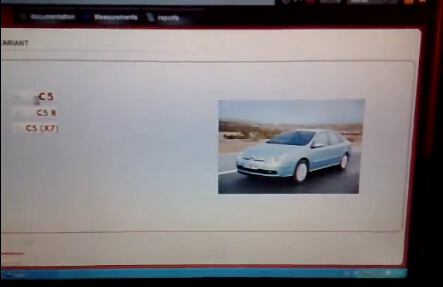
Select vehicle model: C5->C5


Click Tick mark to confirm ACTIVATION notice
Select application as LEXIA
Enter Activation code to activate

Back to APPLICATION menu and select second option
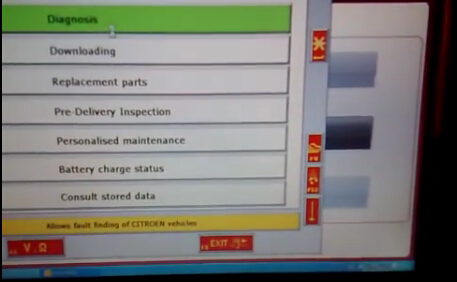
Select Diagnosis


Select Test by function


Switch off the ignition and switch it on again
Select driving aids (4th option)


Pull down the list and select road holding (ABS…)


The system is searching for the vehicle configuration

There are four options under road holding menu:
BSI
Instrument panel
Injection
Anti-lock brake system


Change Instrument panel, Injection and Anti-lock brake system to YES by click corresponding icons


Build communication with ECU
Accept Ecu ESP-MK60 Validate to continue
Accept the system pop-up message
Select “Bleeding” in next interface


Accept windows notice and follow the screen instructions
Bleeding Citroen C5 brake system procedure is complete